
General Customization for the Cart Drawer
Overview
Snap Cart Drawer allows you to customize both the behavior and appearance of your cart drawer to better match your store's branding and shopping experience.
This guide covers the global customization options that apply to the entire cart drawer, including:
- Cart drawer behavior.
- Layout settings.
- Templates and color schemes.
- Typography and colors.
- Custom CSS support.
Note: Customization options for individual features (such as Upsell Products, Reward Progress Bar, Order Summary, or Announcement Bar) are covered in their respective documentation guides.
Global Cart Drawer Settings
Navigate to the Settings tab to configure the overall behavior and layout of your cart drawer.
Cart Position
Choose where the cart drawer appears on your storefront.
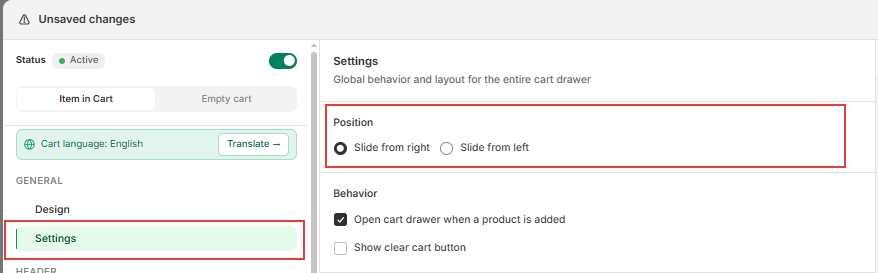
Available options include:
- Slide from right.
- Slide from left.
This setting determines how customers interact with the cart drawer when it opens.
Cart Behavior
You can customize how the cart drawer behaves during the shopping experience.

Open Cart Drawer When a Product is Added
Automatically opens the cart drawer whenever customers add a product to their cart.
This setting is useful for:
- Highlighting upsell opportunities.
- Displaying reward progress.
- Providing immediate feedback after products are added.
Show Clear Cart Button
Displays a button that allows customers to remove all items from their cart with a single click.
This option can be useful for stores that frequently handle larger or customizable orders.
Footer Style
Choose how the footer section behaves when customers scroll through their cart items.
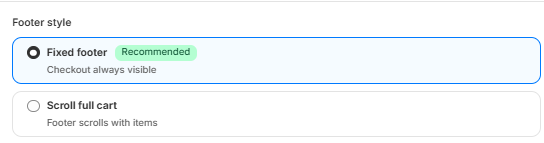
Fixed Footer (Recommended)
Keeps the checkout section visible while customers scroll through their cart items.
This option allows customers to access the checkout button at any time without needing to scroll to the bottom of the cart drawer.
Scroll Full Cart
Allows the footer section to scroll together with the cart contents.
This option provides a more traditional scrolling experience for customers.
Cart Width
Choose the overall width of your cart drawer.

Available options include:
- Normal
- Wide
A wider cart layout may improve readability when displaying additional product information or multiple cart features simultaneously.
Custom CSS
Snap Cart Drawer supports custom CSS for merchants who would like to further customize the appearance of their cart drawer.
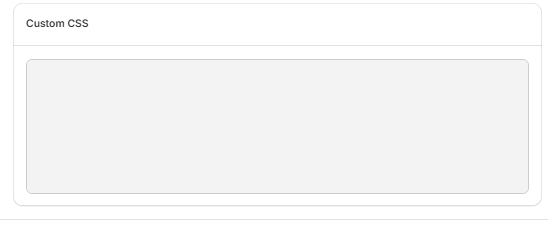
Custom CSS can be used to:
- Override default styling.
- Create advanced visual customizations.
- Match specific branding requirements.
Note: Custom CSS should be used only if you are familiar with CSS or working with a developer.
Global Design Settings
Navigate to the Design tab to customize the overall appearance of your cart drawer.
Match Theme Colors Automatically
Use the Match Theme Colors option to automatically apply colors based on your store's current theme.

If desired, you can click the button again to generate a different color combination.
This option provides a quick way to create a cart drawer design that complements your storefront.
Templates
Snap Cart Drawer currently provides three design templates:
- Classic
- Minimalist
- Modern

Each template offers a different visual style while maintaining the same cart functionality.
Tip: Experiment with different templates to find the design that best matches your store's branding.
Color Schemes
Choose from multiple predefined color schemes to quickly customize your cart drawer's appearance.

Color schemes automatically apply coordinated colors across various cart elements to provide a consistent visual experience.
Font
Select the font family used throughout the cart drawer.
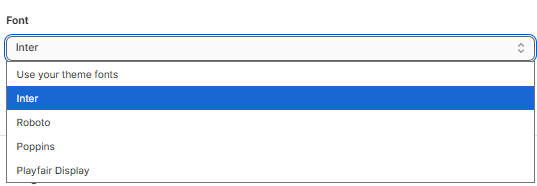
Choosing a font that matches your storefront helps create a more cohesive shopping experience for your customers.
Button Radius
Customize the corner radius of buttons displayed throughout the cart drawer.

Adjusting the button radius allows you to create:
- Sharper corners for a modern appearance.
- Rounded corners for a softer visual style.
Colors
You can customize the global colors used throughout the cart drawer, including:
- Background color.
- Text color.
- Price color.
- Button background color.
- Button text color.
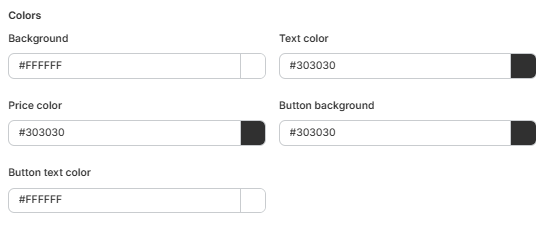
These settings affect the overall appearance of the cart drawer and help ensure consistency across its components.
Customize Individual Features
Many Snap Cart Drawer features provide their own dedicated customization options.
Examples include:
- Upsell Products.
- Reward Progress Bar.
- Announcement Bar.
- Order Summary.
- Confirmation Box.
- Additional Note.
- Trust Badge.
- Estimate Shipping Rate.
Customization options such as typography, colors, layouts, and feature-specific settings are documented within their respective guides.
Note: Feature-specific customization settings are not covered in this guide.
Help & Support
Have questions or running into issues? Reach out to us at [email protected] or via the live chat in the app — we're happy to help!