
How to set up Confirmation Box
Confirmation Box
Overview
Confirmation Box allows you to require customers to acknowledge your store's terms and conditions before proceeding to checkout.
When enabled, customers must check the confirmation box in the cart drawer before they can continue to checkout. This helps ensure customers have agreed to important policies such as terms of service, shipping policies, or refund conditions.
Common use cases include:
- Accepting Terms and Conditions.
- Confirming shipping or return policies.
- Acknowledging subscription or pre-order terms.
- Confirming custom order requirements before checkout.
Note: Customers will not be able to proceed to checkout until the confirmation box is checked.
Configure the Confirmation Box
Confirmation Checkbox Text
Customize the text displayed next to the confirmation checkbox in the cart drawer.
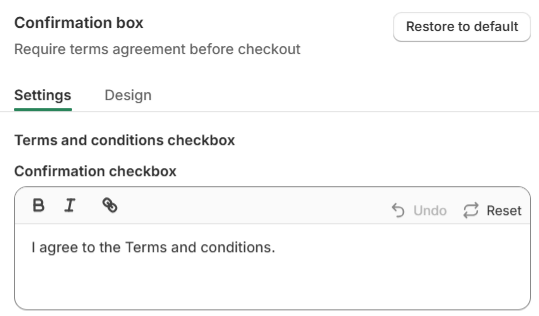
Examples:
- I agree to the Terms and Conditions.
- I have read and agree to the Refund Policy.
- I understand that pre-order items may require additional processing time.
The text editor supports:
- Bold formatting.
- Italic formatting.
- Hyperlinks to external pages, such as your Terms of Service or Shipping Policy.
Tip: Consider adding links to important store policies so customers can review them before completing their purchase.
Checkbox is Ticked by Default
Enable this option if you would like the confirmation box to be checked automatically when customers open the cart drawer.
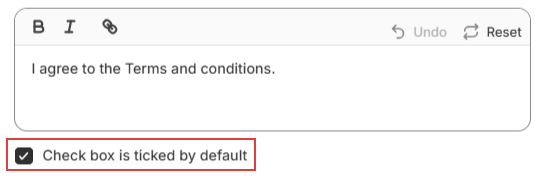
When disabled, customers must manually check the confirmation box before proceeding to checkout.
Note: If the checkbox is not checked, customers will not be able to click the Checkout button.
Customize the Appearance
Navigate to the Design tab to customize the appearance of the Confirmation Box.
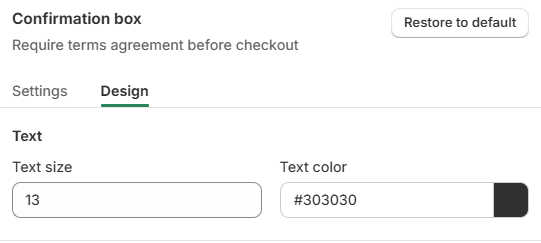
You can customize:
- Text size.
- Text color.
These settings allow you to match the Confirmation Box with your store's branding and improve readability within the cart drawer.
Customer Experience
Once enabled, the Confirmation Box will appear above the checkout payment options in the cart drawer.
Customers must agree to the displayed message before they can proceed to checkout.
This helps ensure that customers have acknowledged any important terms or conditions before placing their order.
Example
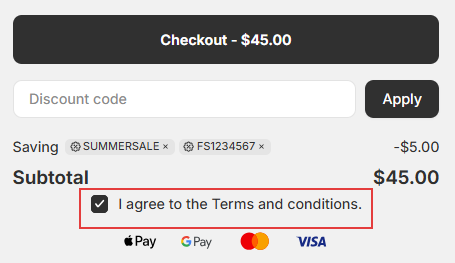
If the checkbox is not selected, the Checkout button will remain unavailable until customers provide their confirmation.
Help & Support
Have questions or running into issues? Reach out to us at [email protected] or via the live chat in the app — we're happy to help!