
Gift Item Added at Full Price? Here’s How to Fix It
If your free gift is being added to the cart at the original price instead of being discounted, the issue is usually caused by one missing setting.
✅ Root Cause
The option “Create discount from app?” is not enabled in your Rewards Progress Bar settings.
Without this option enabled, the app cannot automatically generate and apply the Shopify discount for the free gift — so the product will be added at full price.
🔧 How to Fix It
Please follow these steps:
- Go to Snap Cart Drawer App
- Open your Rewards Progress Bar setup
- Scroll down to the section shown below
- ✅ Tick the option “Create discount from app?”
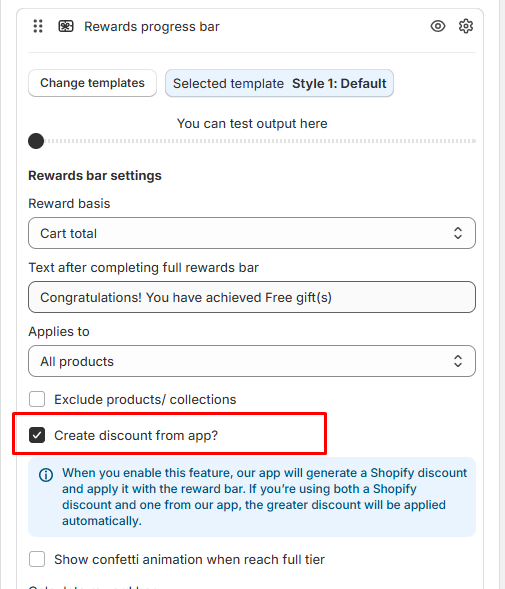
- Click Save
After enabling this option, the app will:
- Automatically generate a Shopify discount
- Apply the discount when the reward condition is met
- Ensure the gift is added at $0 (or discounted correctly)
⚠️ Important Note
If you are using both:
- A Shopify automatic discount
- AND a discount created from our app
Shopify will automatically apply the greater discount.
After saving, please test again by:
- Adding qualifying products to cart
- Reaching the reward condition
- Adding the gift
The gift should now apply correctly at no cost.
Need More Help?
Visit our Help Center: For detailed guides and FAQs, check out our Help Center.
Contact Support: If you have any questions, reach out to our support team at [email protected] or via the live chat section in our app.