
Configure your cart Reward Progress Bar
The Reward Progress Bar is a progress bar that appears inside your cart drawer, showing customers how close they are to unlocking a reward — like free shipping, a discount, or a free gift.
It's a simple but effective way to encourage shoppers to add just a little more to their cart, which helps increase your average order value over time.

Step 1: Enable the Reward Progress Bar
- From your Shopify Admin, go to Apps → Snap Cart Drawer
- Click Edit to open the cart editor
- In the left panel, find Reward Progress Bar under the Header section
- Toggle it on

Step 2: Configure the Settings
Once enabled, click on Reward Progress Bar to open its settings. You'll see two tabs: Settings and Design.
Let's go through the Settings tab first.
Customer Purchases
This section defines how the bar measures a customer's progress.
Measure by — Choose what counts toward the reward:
- Total cart value — Progress is based on how much money is in the cart
- Total item quantity — Progress is based on how many items are in the cart
Applies to — Choose which products count toward the progress:
- All products — Every product in the cart counts
- Specific products — Only certain products you select count
- Specific collections — Only products from selected collections count
- You can also check Exclude products/collections to leave certain items out of the calculation
Calculate reward bar — Choose which price to use when calculating progress:
- Before discounts — Uses the original price
- After discounts — Uses the price after any discounts are applied
💡 Tip: Use the test slider below these settings to preview how the bar looks at different cart values before saving.

Tier Settings
A "tier" is one reward milestone. You can set up up to 3 tiers — for example, free shipping at $50 and a free gift at $100.
To add a new tier, click the "+" button next to the existing tier tabs.
For each tier, fill in the following:
Reward type — What the customer gets when they reach this tier:
- Shipping discount — Discounts or removes the shipping fee. When this is selected, you'll also see an option to apply it to all shipping methods or to specific ones only.
- Discount — Gives a percentage or fixed amount off the order total.
- Product — Adds a free product to the cart. You'll select which product(s) to offer, set whether it's completely free or discounted, and limit how many can be claimed per order.
Min cart value / Min item quantity — The minimum amount (in money or item count) the customer needs to reach before the reward is unlocked.
Reward description — A short label for this reward that appears on the progress bar (up to 15 characters, e.g., "Free shipping").
Text before completing tier — The message shown while the customer hasn't reached this milestone yet. You can use these dynamic variables to make it personal:
{{min_amount}}— automatically fills in how much money is left{{item_count}}— automatically fills in how many items are left
Example: "You are {{min_amount}} away from free shipping!"

Note
The app is currently set to a maximum of 3 tiers for the Rewards Progress Bar. If you would like to enable more tiers, please contact us so we can set it up for you.
Messages
Text after completing full reward bar — The message shown once the customer has reached all milestones.
Example: "Congratulations! You have achieved Free gift(s)"
When Customers Reach Multiple Tiers
If you have more than one tier, you can choose how rewards are given out:
- Only give the highest tier — The customer only receives the reward from the highest milestone they've reached.
- Give rewards from all tiers — The customer receives every reward from each milestone they've passed.

Advanced Settings
- Automatically convert currency — Turns on automatic currency conversion for international shoppers based on Shopify Markets.
- Set different pricing for different markets — Lets you set different reward thresholds for customers in specific countries or regions.

Note
The application is currently configured to allow a maximum of one different threshold rule per cart.
Step 3: Customize the Design
Switch to the Design tab to control how the progress bar looks.
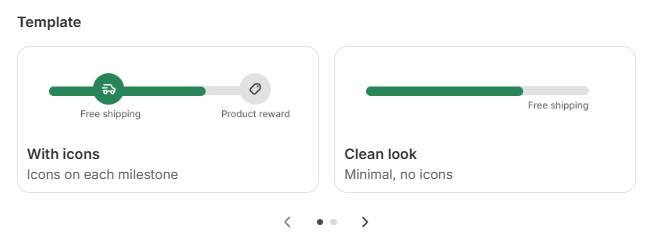
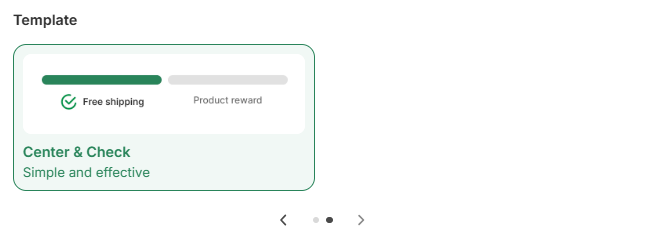
Template — Choose a visual style for the bar:
- With icons — Displays a small icon at each milestone on the bar
- Clean look — A minimal bar with text only, no icons
- Center & Check — A centered layout with a checkmark style, simple and effective
Show confetti when reaching a tier — Check this box to add a fun confetti animation each time a customer hits a milestone.

You can change this behavior to either trigger the confetti only when the final tier is reached or trigger it when each tier is reached.
Text settings — Adjust the font size and color for the reward text and tier labels.
Tier state — Set colors for two states:
- Before tier — The color of the bar and icons before the customer reaches a milestone
- Reach tier — The color after the milestone is unlocked

Step 4: Save and Preview
When you're done, click Save in the top right corner. You can use Preview on test mode to see exactly how the progress bar looks in your cart before going live.